AI credits
What it is for
AI credits are the currency your organization uses to pay for part of the AI features in Doubleros — for example conversations with AI assistants, AI agents and AI image editing. Credits come from two sources: the Monthly allowance of your plan and Purchased credits from packages. Together they make up the Balance.
Where to find it
You see AI credits in three places:
- At the bottom of the left menu there is a Credits card with the current balance and a Detail button. Clicking the card or Detail opens the AI credits dialog (buying and history).
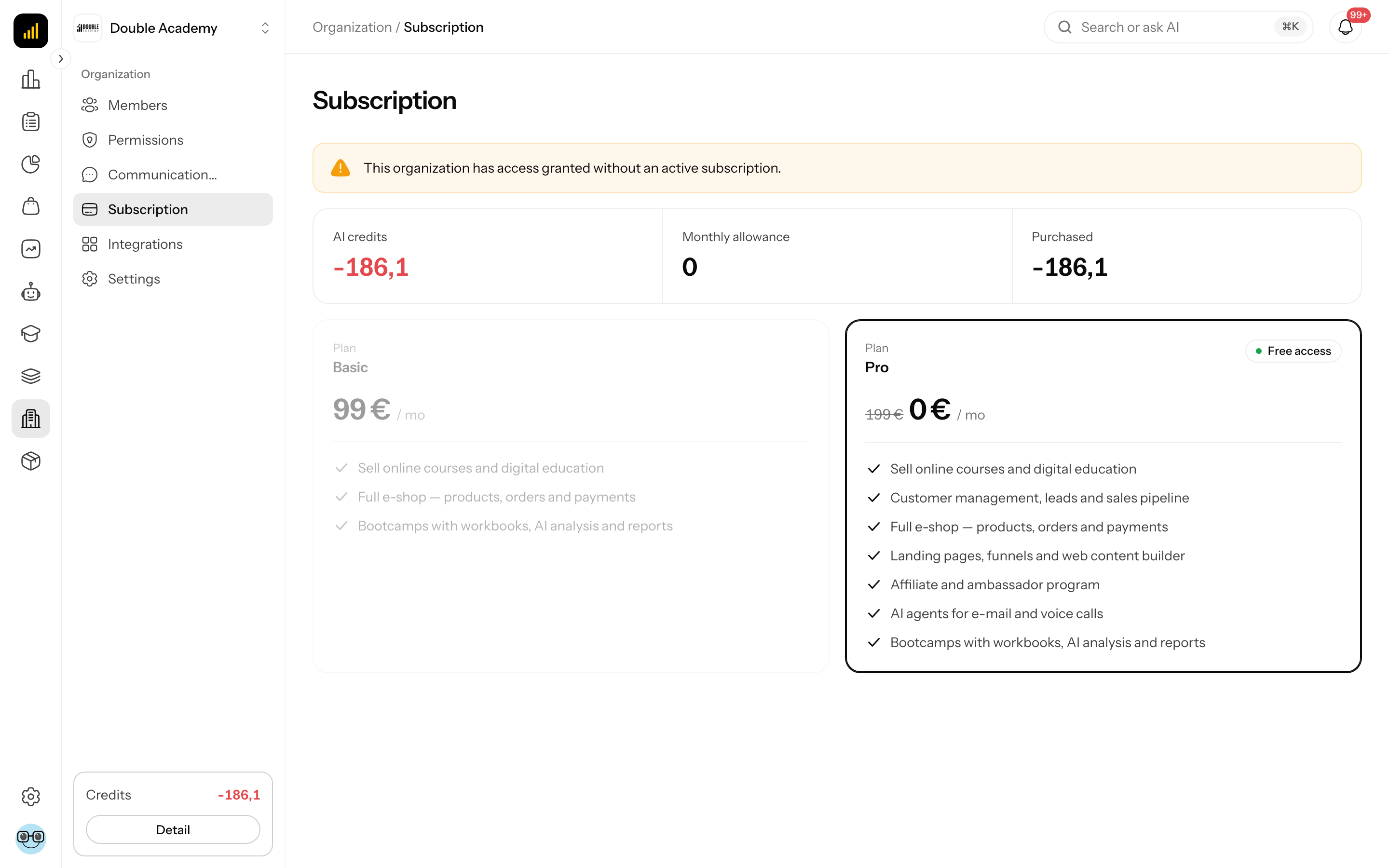
- On the Organization → Subscription screen, a strip at the top shows AI credits, Monthly allowance and Purchased (overview only, no buying).
- When credits run out during an AI conversation, the chat window shows a notice with a Buy credits button.
What I see in the AI credits dialog
The AI credits dialog (opened from the Credits card at the bottom of the left menu) has:
- three numbers at the top:
| Figure | What it means |
|---|---|
| Balance | how many credits you have in total; red at 0 |
| Monthly allowance | what is left of the plan's allowance in this billing period |
| Purchased | what is left of the credits you bought |
- two tabs (if you have the permissions): Top up and History,
- a Close button at the bottom.
How credits are added and used
In Doubleros, AI credits work like this:
- The Monthly allowance is added with every paid subscription invoice that opens a new billing period. Its size depends on your plan.
- An unused monthly allowance does not roll over — at the next period it expires (shown in the history as Expired) and the new allowance replaces it.
- Purchased credits do not expire.
- Usage draws on the Monthly allowance first and only then on Purchased.
- An AI reply that has started always finishes, even if credits drop below zero during it.
What uses credits
| Feature | Paid from the organization's credits? |
|---|---|
| conversations with AI assistants | yes |
| e-mail AI agents | yes |
| AI image editing in Studio | yes, per edited image |
| Ros (AI helper) | no — shown in the history as Platform consumption with 0 credits |
| the AI agent in Communication channels (Telegram) | no — Platform consumption |
| processing knowledge bases, the assistant builder | no — Platform consumption |
Platform consumption rows in the history only record that AI did work; they do not lower the balance.
How to buy credits
Before you start: you need Subscription → Create (without it you do not see the Top up tab) and a payment card.
- At the bottom of the left menu, click the Credits card or the Detail button under it.
- In the AI credits dialog, open the Top up tab (if you have both tabs; otherwise it is open already).
- If packages exist in several currencies, pick the currency top right (for example EUR).
- The package list shows each package's name, number of credits and price. Click the package you want.
- The Stripe payment page opens. Pay.
- Stripe returns you to the app.
Back in the app, the message Credits purchased — thank you! appears and the credits are added to Purchased.
If you see No packages available at the moment instead of packages, the operator has not set up any package for sale yet.
How to check it worked
- Open the AI credits dialog again.
- Purchased and Balance have grown by the credits you bought.
- The History tab has a new Purchase row with a positive number of credits.
How to find out what used your credits
The History tab in the AI credits dialog lists every credit movement.
- At the bottom of the left menu, click the Credits card or Detail.
- In the AI credits dialog, open the History tab.
The table has these columns:
| Column | What it means |
|---|---|
| Date | date and time of the movement |
| Type | kind of movement (see below); below it, in small print, the feature and AI model that used the credits |
| Credits | number of credits; positive ones (green, with +) were added, negative ones were used |
Movement types:
| Type | Meaning |
|---|---|
| Plan allowance | the monthly allowance from the subscription |
| Purchase | a purchased credit package |
| Usage | an AI feature paid from the organization's credits |
| Platform consumption | an AI feature paid by the operator; 0 credits |
| Adjustment | a manual addition or deduction by the operator |
| Refund | credits returned |
| Expired | unused monthly allowance at the end of a period |
Pagination is below the table (10 rows per page). The History tab needs Subscription → View.
What happens when credits run low or run out
- When the balance drops below the threshold (by default 20 % of the monthly allowance), members with Subscription → View get an in-app notification and the organization owner an e-mail.
- When credits run out completely, a notification and an e-mail to the owner follow as well.
- The Credits card at the bottom of the left menu shows the balance in red.
- If the operator has turned on blocking at a zero balance, a new AI conversation does not start: the chat window shows AI credits exhausted with the text Your credits are used up. Buy more to continue the conversation. and a Buy credits button. Other AI features paid from credits report "You have run out of AI credits. Top up to continue."
The rest of the app keeps working. To continue:
- In the notice, click Buy credits (or Credits at the bottom of the left menu).
- Follow How to buy credits.
The next Monthly allowance arrives automatically when the next subscription period is paid.
Who can do this
| What you want to do | Permission needed |
|---|---|
| see the balance (Credits card, AI credits dialog) | none — every member sees it |
| buy credits (Top up tab) | Subscription → Create |
| see the history (History tab) | Subscription → View |
Permissions are set in the Permission matrix, row Organization → Subscription.
Common questions and problems
I see no tabs in the AI credits dialog. You have neither Subscription → Create nor Subscription → View — you see only the numbers. Ask the owner for the permission.
During the trial my Monthly allowance is 0. The monthly allowance is added with a paid subscription invoice. If you need credits earlier, buy a package.
Where did last month's credits go? An unused Monthly allowance expires at the end of the period (an Expired row). Purchased credits stay.
The balance is slightly negative. An AI reply that has started always finishes; the difference is taken from purchased credits. It evens out once you top up.
Generating a website in Studio did not use any credits. Correct — generating and editing pages in Studio and Ros are not paid from the organization's credits. AI image editing is.
I paid for a package but the credits did not arrive. Credits are added once Stripe confirms the payment, usually within seconds. Close and reopen the AI credits dialog. If they are still missing after a few minutes, report it.
Related
- Subscription — the plan and its monthly allowance
- Assistants — conversations paid from credits
- AI Studio — AI image editing
- Ros (AI helper)