Salespeople
What it is for
The Salespeople report in Statistics shows how the team performs in the CRM: how many open and won deals each salesperson has, their closing rate, their tasks, how they meet their target, what revenue reached them from orders and how much money sits in the open pipeline. Clicking a salesperson opens their history — what they did and when.
Where to find it
In the left menu click Statistics, then Salespeople in the expanded list (address /dashboard/reports/finance?tab=salespeople). The page header reads Statistics / Salespeople.
Other reports in the same list: Finance, Sales, Membership.
Before you start: where the numbers come from
The Salespeople report reads data from the CRM and from orders. To show anything you need:
- team members — the report lists every internal member of the organisation (see Members),
- deals in the CRM with an owner and a price (see Deals); won and lost deals count by their won or lost date,
- salesperson targets set in the CRM (see Targets) — without them the salesperson shows no target,
- for the revenue card, a salesperson assigned to the order in the order detail (see Orders).
To view the report you need the permission Statistics → View.
How to set the period of the Salespeople report
Above the cards of the Salespeople report is the filter row Period (Week, Month, Year; default Month), From (default the first day of the month a year ago) and To (default today).
- In the left menu click Statistics → Salespeople.
- In Period choose how charts over time are grouped.
- Pick a date in From and in To.
The period does not apply to everything alike:
| Data | From – To period |
|---|---|
| won and lost deals, closing rate, target fulfilment, revenue from orders, done tasks | yes |
| Open deals, open tasks, the Pipeline – potential (open deals) card | no — always the current state |
| Salesperson history | no — always the latest records |
What I see on the Salespeople screen
The Salespeople report has these cards from top to bottom:
| Card | What it shows |
|---|---|
| Salespeople overview | one row per team member: deals, closing rate, tasks, target fulfilment |
| Salesperson target fulfilment | value of won deals against each salesperson's and the company target |
| Closing rate (WON / WON+LOST) | share of won among closed deals, trend and table |
| Closed over time (value of WON deals) | value of won deals over time per currency |
| Salespeople by revenue (excl. VAT) | revenue from paid orders by assigned salesperson |
| Pipeline – potential (open deals) | value of open deals by stage and expected close |
On the right of the filter row is the Export whole tab (CSV) icon, and the cards have an Export CSV icon.
How to read the Salespeople overview card
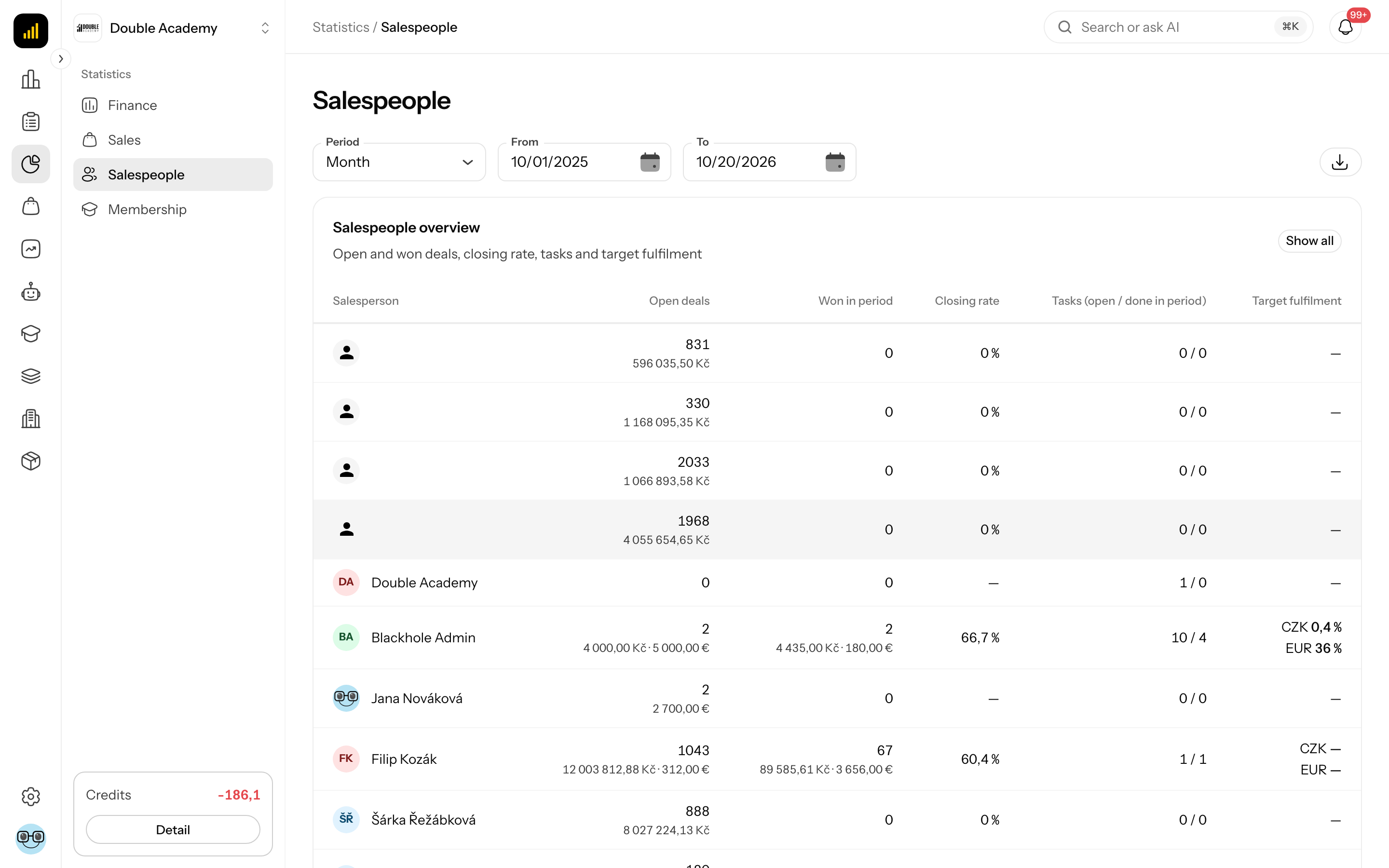
The Salespeople overview card in the Salespeople report (subtitle Open and won deals, closing rate, tasks and target fulfilment) has these columns:
| Column | Meaning |
|---|---|
| Salesperson | name and avatar of the team member |
| Open deals | number of open deals, with their value in each currency below (current state) |
| Won in period | number of deals won in the period and their value |
| Closing rate | won / (won + lost) in the period; — if nothing was closed |
| Tasks (open / done in period) | e.g. 4 / 12 — open now / completed in the period |
| Target fulfilment | target fulfilment percentage per currency; — without a target |
Members with no activity at all are hidden by default. Show everyone by clicking the Show all chip at the top right of the card; click it again to hide them.
Clicking a salesperson's row opens the Salesperson history window (see How to view a salesperson's history).
How to read the Salesperson target fulfilment card
The Salesperson target fulfilment card in the Salespeople report shows the exact period in its subtitle. Each currency has a table:
| Column | Meaning |
|---|---|
| Salesperson | first row Company-wide (the company target), then the salespeople; Unassigned = deals without an owner |
| Actual | value of deals won in the period |
| Target | sum of the monthly targets in the period; — without a target |
| Fulfilment | progress bar and percentage; no target without a target |
The target is measured against won deals in the CRM, not orders. A target month counts in full when the period starts in the middle of it.
How to read the Closing rate card
The Closing rate (WON / WON+LOST) card in the Salespeople report shows:
- at the top right Company with the overall rate and the WON and LOST counts,
- a line chart Closing rate (%) by week / month / year,
- a table Salesperson | WON | LOST | Total | Closing rate; deals without an owner are in the No salesperson row.
A won deal counts on its won date, a lost one on its lost date. The closing rate is not split by currency. With no closed deals the card shows No closed deals (WON/LOST) in the selected period.
How to read the Closed over time card
The Closed over time (value of WON deals) card in the Salespeople report is a bar chart of the value of deals won in each week / month / year, per currency. A deal belongs to its won date and its value comes from the deal's prices.
How to read the Salespeople by revenue card
The Salespeople by revenue (excl. VAT) card in the Salespeople report counts paid orders, not the CRM. Each currency has a table Salesperson | Net | Orders | Clients | Share. The salesperson is the one assigned to the order in the Sales rep card of the order detail; orders without one are in the Unassigned row. Amounts exclude VAT and an order belongs to its creation date.
How to read the Pipeline – potential card
The Pipeline – potential (open deals) card in the Salespeople report shows the value of all currently open deals — the From – To filter does not affect it. Each currency has two tables:
- By stage — Stage | Value | Count,
- By expected close — Month | Value | Count; deals without an expected close date are in the No date row.
Open deals without a price are listed under the currency — with value 0 so that the counts add up. With no open deals the card shows No open deals.
How to view a salesperson's history
- In the left menu click Statistics → Salespeople.
- In the Salespeople overview card click the salesperson's row (if they are not listed, click Show all).
- The Salesperson history window opens with the salesperson's name.
- At the top choose a mode:
| Mode | What it shows | Groups on by default |
|---|---|---|
| Monthly view | key events grouped by month | Deals, Orders, Forms |
| Daily view | all work grouped by day, with a count summary per day | all groups |
| System activity | what the salesperson created, changed or deleted in the app, by day | all actions |
- Below the mode switch group chips on or off (in Monthly view and Daily view): Deals, Orders, Forms, Tasks, Notes. In System activity there are instead chips for the actions the salesperson actually has — e.g. Create, Update, Delete, Status change, Email sent, Event.
- Close the window with Close.
Events in Monthly view and Daily view: Deal created, Deal won, Deal lost, Deal reopened, Task created, Task completed, Note added, Form shared, Order created, Order paid. Events link to the client in the CRM, orders to their detail.
System activity shows only the action, record type, time and name of each record — not the content of the change.
The history is not limited by the report period: it shows the latest records (at most 600 events, 500 in system activity). Every time it opens, the window starts in Monthly view with the default groups. When nothing matches the filter, No results found is shown.
How to export the Salespeople report to CSV
- In the Salespeople report set the period.
- Click the Export CSV icon of a card, or the Export whole tab (CSV) icon on the right of the filter row.
The whole tab contains the cards Salesperson target fulfilment, Closing rate, Closed over time, Salespeople by revenue and Pipeline – potential. The Salespeople overview card and the Salesperson history are not exported. The file uses a semicolon separator.
How to check that the Salespeople report works
- In the CRM mark a salesperson's deal as won (see Deals).
- In Statistics → Salespeople set To to today.
- In the Salespeople overview the salesperson's Won in period goes up, and the Salesperson history gains Deal won.
Who can do this
| What you want to do | Permission needed |
|---|---|
| see the Salespeople report including every salesperson's history, and export it | Statistics → View in the permission matrix |
The Statistics item appears in the left menu only when the organisation's plan includes the CRM module — without CRM it is hidden even with the Statistics → View permission.
Whoever has this permission sees the figures and history of all salespeople — there is no own-data-only restriction.
Frequently asked questions and problems
A salesperson is missing from the Salespeople overview. They have no activity in the period. Click Show all. External members are not in the report.
The salesperson shows "no target". No CRM target is set for the months of the period. Set one in Targets.
Target fulfilment does not match revenue from orders. The target is measured against won deals in the CRM; revenue from orders is in the Salespeople by revenue (excl. VAT) card.
The pipeline does not change when I change the period. The pipeline is the current state of open deals and the period filter does not affect it.
Why is the currency "—"? The open deal has no price.