Targets
What it is for
A target is a monthly goal – how much one salesperson or the whole company should sell. It is set for a specific month, metric and amount in each currency. Personal targets with the Paid metric are compared with reality on the CRM → Today screen in the My target fulfilment card.
Where to find it
- In the left menu, click CRM – the item expands.
- Click the Results sub-item.
- In the tabs under the heading click Targets (the other option is Reports).
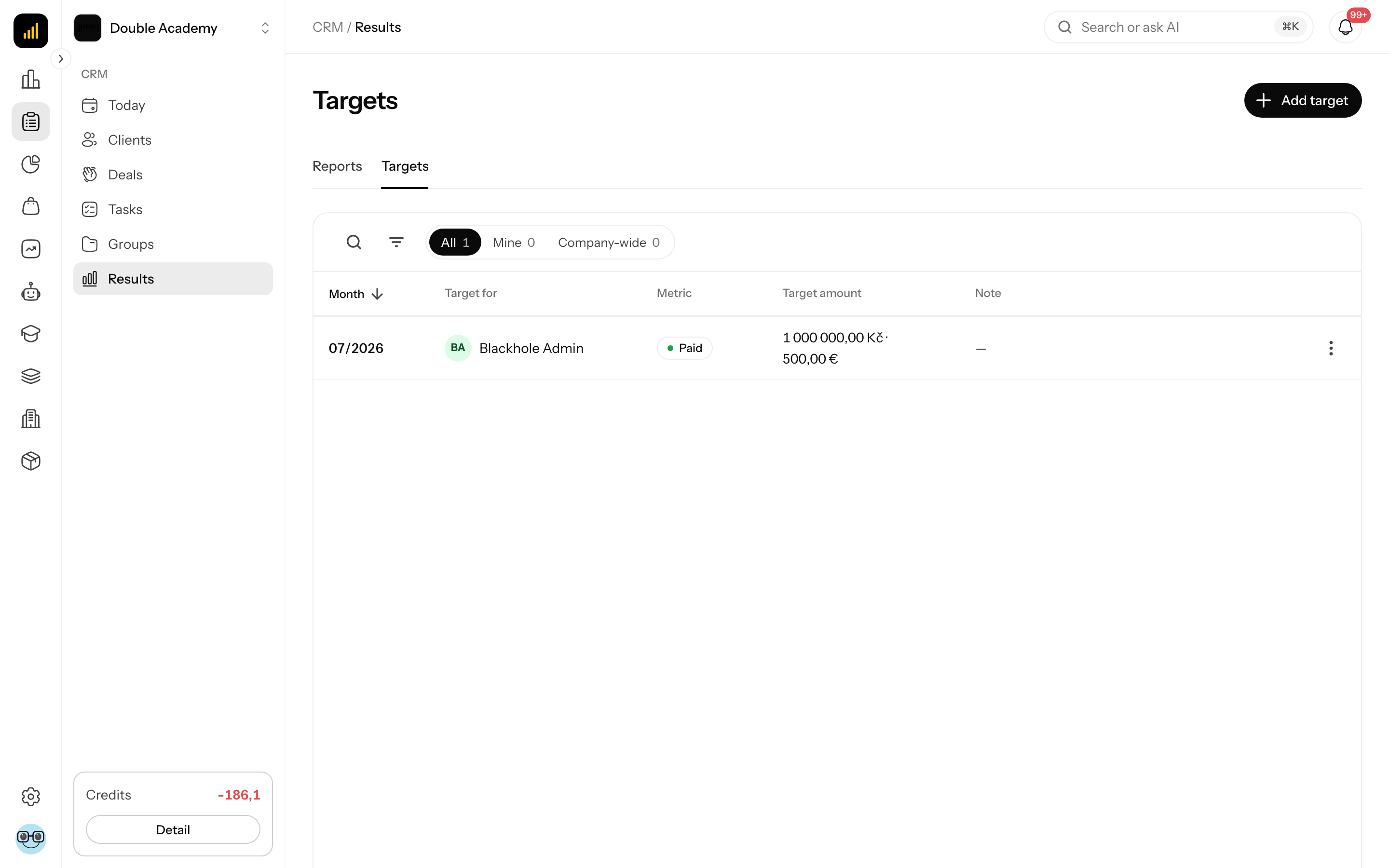
Target metrics
| Metric | What it means |
|---|---|
| Paid | a target for what is to be paid |
| Sold | a target for the value of sold (won) deals |
You choose the metric when creating the target and cannot change it later.
What I see in the Targets list
At the top right is the Add target button (only with the right to manage targets).
Tabs above the table:
| Tab | What it shows |
|---|---|
| All | all targets |
| Mine | targets set for you |
| Company-wide | targets for the whole company |
Table columns:
| Column | What it means |
|---|---|
| Month | the target month in MM/YYYY format |
| Target for | the salesperson's name, or Company-wide |
| Metric | Paid or Sold |
| Target amount | amounts in all currencies, separated by a dot |
| Note | an optional note |
Click the Month header to change the order (newest first by default). Below the table is pagination (25 rows by default).
The “…” menu at the end of a row: Edit and Delete – only with the right to manage targets.
Search and filter: the magnifier icon Search opens a search by the name in the Target for column; the Filters icon opens a window with the Metric filter (All, Paid, Sold).
How to add a target
Before you start:
- you need the Edit right on the Reports row of the permission matrix,
- the target currencies are the organization's Supported currencies (Organization → Settings, Localization section),
- the salesperson you set the target for must be an internal member of the organization.
Steps:
- In the left menu click CRM → Results and in the side navigation Targets.
- At the top right click Add target. The Add target window opens.
- Fill in the fields according to the table.
- Click Create. The button is inactive until you fill in at least one amount.
| Field | Required | What it means | Limits / default |
|---|---|---|---|
| Target for | yes | Company-wide, or one or more salespeople | Company-wide by default; selecting a salesperson removes Company-wide and vice versa; only internal members can be selected |
| Month | yes | the month the target applies to | the current month by default |
| Metric | yes | Paid or Sold | Paid by default |
| Target amount | at least one | the target amount; there is a separate field for each supported currency | an empty field = no target in that currency |
| Note | no | any comment | – |
What happens after saving: when several salespeople are selected, each gets their own target with the same parameters. The combination who + month + metric + currency can exist only once. If some target already exists, it is skipped and Created: number, skipped (already exist): number is shown. If all exist, A target already exists for the selected scope, month and metric. is shown and nothing is created.
How to check that it works: a salesperson with a Paid target for the current month sees a radial gauge for each target currency in CRM → Today in the My target fulfilment card.
How to edit a target
- Open CRM → Results → Targets.
- In the target's row click “…” → Edit. The Edit target window opens.
- Change the Target amount in individual currencies or the Note.
- Click Save.
The Target for, Month and Metric fields are locked when editing – they are part of the target's identity. If you made a mistake in any of them, delete the target and create a new one. Clearing the amount in a currency removes the target in that currency; filling in a new currency adds it.
How to delete a target
- Open CRM → Results → Targets.
- In the target's row click “…” → Delete.
- Confirm the question Delete this target? with the Delete button.
The target is deleted in all currencies of that row. The Today screen then shows no target for this month.
Who can do this
Permissions are set by an administrator in Organization → Permissions, CRM module, Reports row – see Permission matrix.
| Right | What it allows |
|---|---|
| View | the Results item in the menu and the target list |
| Edit | Add target, Edit, Delete |
Without the Edit right you cannot set a target even for yourself – your manager sets it for you.
Common questions and problems
The Results item is missing from the menu. You do not have the View right on the Reports row.
I do not see the Add target button. You do not have the Edit right on the Reports row.
The Target amount field is missing in the window. The organization has no Supported currencies set.
The Create button is inactive. Fill in at least one Target amount.
I set a Sold target but do not see it on the Today screen. The My target fulfilment card compares only with a target with the Paid metric.
Is a company-wide target the sum of personal targets? No. It is a separate figure that you set separately.